Jet lag support



FAQs
How do I redeem a code?
Please click here to redeem your code.
Are the astronauts on your website real?
Yes! The astronauts are real and are investors in Timeshifter.
Former NASA Astronaut and Chief Astronaut at Axiom Space, Commander Michael López-Alegría, has completed five space missions on Space X, Space Shuttle, and Soyuz. He holds NASA records for most extravehicular activities (EVAs) or ”spacewalks” (10), cumulative EVA time (67 hours, 40 minutes), and for the 3rd longest spaceflight at 215 days!
Another legendary astronaut you might have seen on our site is Professor Mike Massimino. Mike has successfully completed two of the hardest space missions – both to repair the Hubble Space Telescope. He also was the first person to tweet from space! Today, Mike is a Professor of Mechanical Engineering at Columbia University.
Another one of our investors, Dr. Smith Johnston, is a former NASA flight surgeon and Chief Medical Officer at Axiom Space. He was the head of the Fatigue and Longevity Programs at NASA for many years and developed the first circadian desynchrony program to help NASA astronauts and mission controllers manage jet lag, shift work disorder and circadian challenges during space light. Our Chief Scientist, Dr. Steven W. Lockley, continues to assist NASA today.
Timeshifter is tightly connected with astronauts because circadian science has been a critical part of enhancing the safety and performance of astronauts on space missions for many decades, as NASA understand the critical importance of circadian rhythm management to reduce the safety and health risks of clock disruption. Circadian plans are carefully crafted to help astronauts reduce jet lag when traveling for training visits, align with rocket launch and spacewalk timing, and control their day-night cycle when living aboard the International Space Station, including shifting their schedules for space walks, docking and undocking. Mission controllers are provided with circadian plans to support these missions 24/7, without compromising anyone’s safety.
Can’t I simply move my sleep to adjust quickly?
Jet lag is more than just a sleep disorder – it affects all the biological systems that the circadian clock controls. Focusing on sleep alone will not be effective and, given that sleep blocks light to the circadian clock when you close your eyes, means that sleep at the wrong time will send the wrong light signal to the brain, making jet lag worse.
If you shifted sleep for many days leading up the trip it might help, but in the real world, this approach is not practical. For example, a 6-hour time change from New York to Paris would need you to sleep from 5pm to 1am leading up the trip and staying awake all night. When coming back, you would need to sleep in Paris from 5am to 1pm to adapt back to New York time, again an impractical solution. Our Practicality Filter ensures that sleep is scheduled at a time when it will help with your circadian adaptation AND is practical to stick to.
Is it always a good idea to see sunlight at the destination?
The light-dark cycle is the strongest time cue for resetting the circadian clock. Depending on when you see light, it can shift your circadian clock either earlier or later. For many trips, seeing light when you land can shift the clock in the wrong direction, making jet lag worse and prolonging the number of days it will take you to adapt. You might even get 'stuck’ at the wrong time, ruining your vacation or business trip. The timing of light exposure is therefore not intuitive and generic advice does not work – proper advice requires estimation of your internal body clock time in order to schedule sunlight (or any light) exposure properly.
Can I print the jet lag plan?
We currently don’t offer an option to print or export the plan. We recommend using the Timeshifter app, as it sends you timely reminders for each upcoming activity to help you stay on track.
How do I change my advice settings?
Go to your profile settings by tapping the small profile icon in the bottom left corner of your screen. Here, you will find your advice settings.
Some advice settings can only be changed when you don't have an active jet lag plan.
If you have not yet departed and want to force a change in the settings, delete your flights, update the settings, and add your flights back to generate a new jet lag plan.
Why isn’t the password reset working?
When you request a password reset, we send you an email with a link to a password reset page. If you’re using an iPhone, tapping the link might sometimes open the app instead of the password reset web page.
To resolve this, open the link on your computer, or copy and paste the URL into your mobile browser.
Can I start my plan earlier than recommended?
No, the plan you receive is the optimal plan for your trip.
While it's technically possible to start a plan earlier, it would require that you take actions that are often impractical and unlikely to fit into your normal schedule. Very few people - apart from elite athletes and astronauts - have a schedule flexible enough to accommodate such adjustments, and the risk of noncompliance would be too high. Therefore, we recommend following the plan as provided to ensure the best results.
I can't input flights in the past?
To effectively tackle jet lag, it is crucial to begin timeshifting before your departure.
If you start timeshifting after your departure, we lack information about your light exposure and sleep patterns since you left. These factors significantly influence your circadian clock, potentially shifting it towards or away from your destination time zone.
Starting your jet lag plan before your departure ensures that we have the correct information to help you adjust effectively to your new time zone.
Will the app work in flight mode or without internet?
Yes, once the plan has been created the app will not be needing internet anymore. Internet is only needed when you create or modify your plan.
Will I receive notifications?
Yes, you will receive push notifications automatically if you have this feature turned on.
To check whether push notifications are enabled, tap the profile icon, and then tap ‘Push notifications’.
Where is my jet lag plan?
Once you have added your flights in the app, your jet lag plans will be listed on the advice page as circles with a destination and a date. If you do not see your jet lag plans, tap the middle icon with three stripes to view them.
Please note that we group your flights based on the optimal way to handle your jet lag. Typically, your flights will be separated into an outbound jet lag plan and a homebound jet lag plan.
If you have a multi-city trip, your flights may be grouped differently than you expect.
What should I do if my flight is delayed or cancelled?
Was your flight delayed? Or did you change your travel plans? Learn how to edit flight times, delete, and replace flights with ease.
Added the wrong flight(s) to your basket?
When adding flights to your trip, mistakes can happen. If you need to remove a flight from your list before submitting, simply swipe left on the flight and tap the red Delete button.
Have a delayed flight?
Most of the time, everything goes according to plan. But occasionally, flights get delayed or travel plans change, and you need to adjust your departure and arrival times. Sometimes, you might even need to replace a flight if you're rerouted to your destination.
Edit your flight within 3 hours of your original departure time
When that happens, be sure to edit your flights as soon as you have the new information. This will update your advice and ensure your jet lag plan still aligns with your new schedule. If you did not edit your flight in time and it is greyed out, please contact customer support.
How you edit your flights
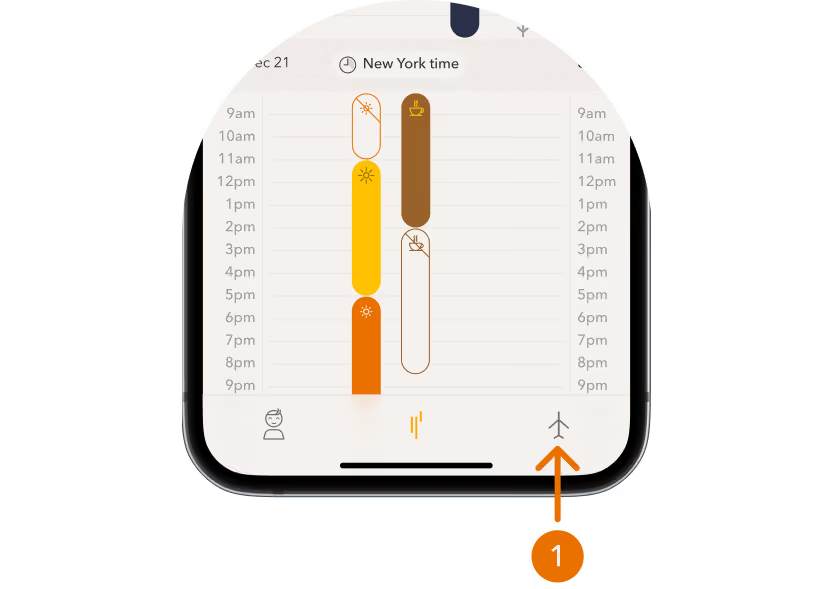
- Go to "Flights": Open your app or account and navigate to the "Flights" section.
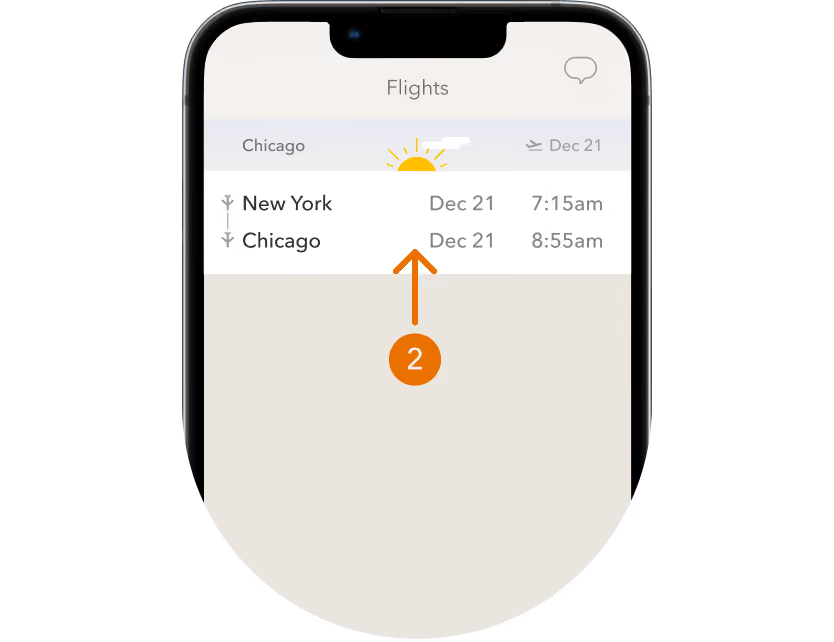
- Tap on Each Flight: Select the flight you need to change.
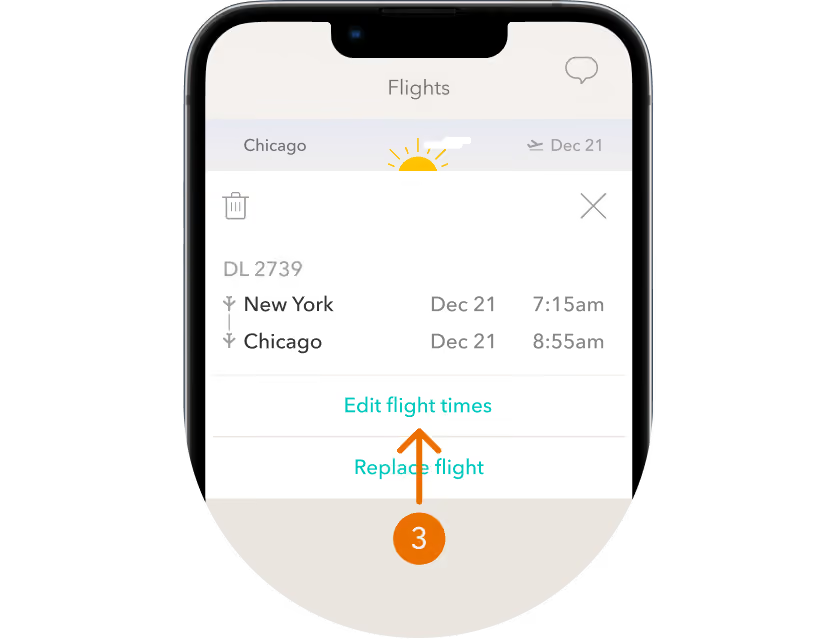
- Edit, Replace, or Delete:
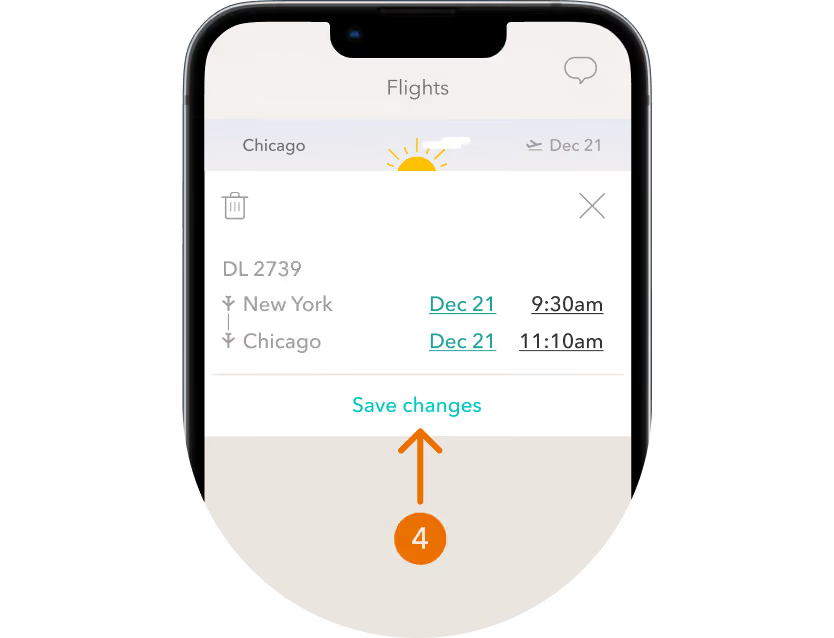
- Edit Flight Times: Update the departure and arrival times to match your new schedule.
- Replace Flights: If you've been rerouted, enter the new flight details.
- Delete Flights: Remove any flights that are no longer part of your travel plans.
- Save your changes: Saving your changes updates your plan immediately
Making these updates promptly helps keep your itinerary accurate and your plans on track. Safe travels!